The Problem Hasn’t Gone Away
If you’ve worked with Divi for any length of time, you know the feeling: the page loads and for a split second everything jumps. Headers shift, hero text snaps into position, columns expand. This is the combination of two related issues FOUC (Flash of Unstyled Content) and CLS (Cumulative Layout Shift).
Divi 5 was supposed to be a clean slate. New architecture, better performance, rebuilt from the ground up. And in many ways it is an improvement. But the core issue remains: Divi relies heavily on JavaScript to initialize its layout engine, and until that JS runs, the browser renders elements with incomplete or incorrect dimensions. The result is visible layout shifts that hurt both user experience and your Core Web Vitals score.
The “Fix” You’ll Find Online And Why It’s Wrong
Search for “Divi CLS fix” and you’ll quickly find this snippet recommended across forums and YouTube tutorials:
<script type="text/javascript">
  var elm = document.getElementsByTagName("html")[0];
  elm.style.display = "none";
  document.addEventListener("DOMContentLoaded", function(event) {
    elm.style.display = "block";
  });
</script>
The idea is simple: hide the entire page until Divi finishes loading, then reveal it. No visible shifts, problem solved. Except it isn’t solved it’s masked.
Here’s what this script actually does to your metrics:
- Kills FCP (First Contentful Paint). The browser renders nothing until DOMContentLoaded fires, which on a typical Divi site can be 3–5 seconds
- Destroys LCP (Largest Contentful Paint). Your hero image or H1 can’t be measured until it becomes visible, pushing LCP well past the “Good” threshold
- Hides the problem from you. Your CLS score improves on paper, but the underlying cause is untouched. Any change to Divi, a plugin, or a theme update can break it again
This is the web performance equivalent of putting tape over the warning light on your dashboard. The CLS score in PageSpeed Insights might look good, but the actual page experience is worse than before.
The Right Approach: Diagnose First, Fix Precisely
The correct solution is to identify exactly which elements are shifting and why then write CSS rules that give the browser the correct dimensions before Divi JS runs.
Step 1: Install a CLS Logger
Before touching any code, instrument the page with a PerformanceObserver that logs every layout shift with element selectors, dimensions before and after, and timestamps. This tells you precisely what is moving and when.
In a real client project, the logger revealed two distinct shift events:
- ~370ms after navigation: A flex column expanding from 1120px to 1260px Divi’s JS recalculating the grid after initialization
- ~200ms: A ::after pseudo-element on nav items resizing from 8×18px to 16×16px an icon loading asynchronously
Two completely different causes requiring two completely different fixes.
Step 2: Fix the Header with CSS
The header CLS is almost always caused by elements that don’t have explicit dimensions in the rendered HTML — logo images without width/height, nav icons loaded via CSS, menu containers that resize once fonts load.
The fix is explicit sizing applied before any JS runs:
/* Reserve exact space for logo before it loads */
header .et_pb_menu__logo img {
  height: 48px;
  width: auto;
}

/* Fix nav icon pseudo-elements */
header .wpml-ls-flag {
  width: 18px;
  height: 12px;
}

/* Lock header row height */
header.et-l--header .et_pb_row_0_tb_header {
  min-height: 76px !important;
}
Step 3: Fix the Column Width Mismatch
The column expansion (1120px → 1260px) is a classic Divi 5 issue. The cached CSS contains one max-width value, but the JS layout engine recalculates to a different value after initialization.
First, check your cached CSS file (et-core-unified-{id}.min.css) to see what max-width is set for .et_pb_row. Then lock the correct value in CSS:
@media (min-width: 768px) {
  .home .et_pb_section_2 .et_pb_row_1 {
    max-width: 1260px !important;
    width: 100% !important;
  }
  .home .et_pb_section_2 .et_pb_row_1 .et_pb_column_1 {
    width: 100% !important;
    max-width: 100% !important;
    flex: 0 0 100% !important;
  }
}
Step 4: Fix the Fullwidth Slider FOUC
The slider description text was visually jumping not because of a layout shift, but because Divi JS repositions it during initialization. The text renders in one position, then snaps to its final position once the slider is initialized.
The clean solution: hide the description with opacity: 0, then reveal it the moment Divi adds its initialization attribute to the slider element. No JS required pure CSS attribute selector:
/* Hide description until slider initializes */
.et_pb_fullwidth_slider_0 .et_pb_slide_description {
  opacity: 0;
  transition: opacity 0.5s ease 0.1s;
}

/* Divi adds data-active-slide when JS initializes the slider */
.et_pb_fullwidth_slider_0[data-active-slide] .et_pb_slide_description {
  opacity: 1;
}
This approach is fundamentally different from the hide-everything hack: only the affected element is hidden, only for the duration of the actual problem, and opacity changes don’t affect LCP measurement.
Step 5: Handle Dynamic Elements with a Targeted Observer
Some elements like absolutely-positioned promo blocks that Divi moves with JS can’t be fixed with static CSS alone. For these, a small inline script that hides only the specific element and reveals it after Divi’s class-based initialization signal is the right tool:
(function () {
  // Inject targeted hide rule immediately
  var guard = document.createElement('style');
  guard.textContent = '.et_pb_promo { opacity: 0 !important; }';
  document.head.appendChild(guard);

  // Watch for Divi's initialization class on body
  var obs = new MutationObserver(function () {
    if (document.body.classList.contains('et-db')) {
      obs.disconnect();
      // Reveal with transition
      guard.textContent = '.et_pb_promo { opacity: 1 !important; transition: opacity 0.2s ease !important; }';
    }
  });
  obs.observe(document.body, { attributes: true, attributeFilter: ['class'] });

  // Fallback — never hide indefinitely
  setTimeout(function () {
    obs.disconnect();
    guard.textContent = '.et_pb_promo { opacity: 1 !important; }';
  }, 1000);
})();
The key differences from the page-hide hack: scoped to one element, uses Divi’s own initialization signal as the trigger, has a timeout fallback so it never permanently hides content.
The Result
After applying targeted CSS fixes no page-hiding scripts, no plugins that manipulate scores:
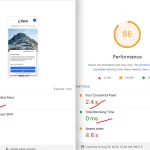
- CLS: 0.01 (Good)
- No impact on FCP or LCP
- Every fix is tied to a specific diagnosed cause
- No hacks that break on the next Divi update
Why This Matters Even More in 2026
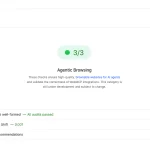
In May 2026, Google added a new Agentic Browsing category to PageSpeed Insights (via Lighthouse 13.3). It evaluates how well AI agents tools like ChatGPT Browse, Perplexity, and Google’s own Project Mariner can interact with your site.
One of its three core checks is CLS.
AI agents take screenshots and interact with page elements programmatically. A layout that shifts unexpectedly doesn’t just frustrate human visitors it actively confuses automated agents trying to read, navigate, and act on your content. Fixing CLS now improves both your Core Web Vitals score and your Agentic Browsing result.
The sites that invest in layout stability today are building a foundation that works for both human users and the AI-driven traffic that’s becoming an increasingly significant part of web visits.
Need Help With Your Divi Site?
Diagnosing and fixing CLS properly takes time the right logger setup, reading cached CSS files, understanding how Divi’s JS initialization sequence works, and writing fixes that survive theme updates.
If your Divi site has CLS or FOUC issues and you want them fixed cleanly without shortcuts that damage your other Core Web Vitals feel free to reach out. I’ve worked through these issues across multiple Divi projects and can diagnose and fix the specific causes on your site.

Written by Anton K, founder of Oswoptimize (known as swoptimize on Fiverr) and an SEO & Web Performance expert with 15+ years of experience optimizing WordPress sites, improving Core Web Vitals, and increasing search rankings.


Leave a Reply