Recently, I had an interesting case while working on a client’s website. Everything looked simple: submit a Gravity Form > show a download link. But Gravity Forms sanitizes confirmation HTML, which means attributes like target=”_blank” are either stripped or ignored in some setups.
At first, this was surprising until I remembered that Gravity Forms often renders confirmations dynamically via AJAX. That’s where a small JavaScript workaround comes in handy.
Solution: We listen for DOM changes and update the confirmation link after it appears. Below is a clean and reliable solution.
Step 1: In the Gravity Form settings, you must select Confirmations>Text and enter the following in the code field:
<p>Thank you! Your e-book is <a href="https://google.com/ebook.php" target="_blank" rel="nofollow noopener noreferrer">ready to download</a></p>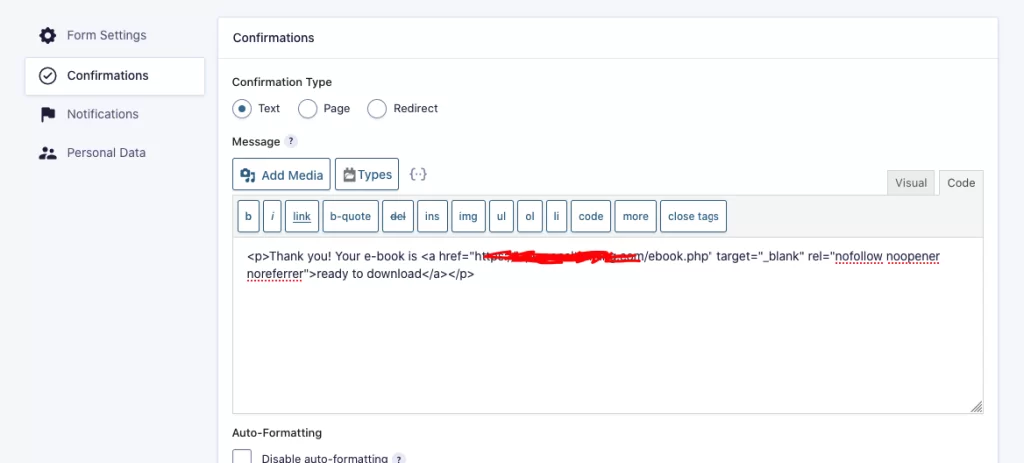
Step 2: Just change the form ID and paste this code into your child theme’s functions.php file.
<?php
// Open Gravity Forms confirmation download link in a new tab (homepage only)
add_action('wp_footer', function () {

    // 🔹 Change this condition if you want it on all pages
    if ( ! is_front_page() ) return;

    ?>
    <script>
    document.addEventListener("DOMContentLoaded", function () {

        // Watch the entire page for dynamically added content
        const targetNode = document.body;
        const config = { childList: true, subtree: true };

        const callback = function (mutationsList, observer) {
            for (let mutation of mutationsList) {
                mutation.addedNodes.forEach(node => {
                    if (node.nodeType === 1) {

                        // CHANGE #1:
                        // Replace "10" with your Gravity Form ID
                        const link = node.querySelector(
                            'div#gform_confirmation_message_10 a[href*="ebook.php"]'
                        );

                        if (link) {
                            // Force new tab
                            link.setAttribute('target', '_blank');

                            // SEO & security best practices
                            link.setAttribute(
                                'rel',
                                'nofollow noopener noreferrer'
                            );

                            // Stop observing once the link is fixed
                            observer.disconnect();
                        }
                    }
                });
            }
        };

        const observer = new MutationObserver(callback);
        observer.observe(targetNode, config);
    });
    </script>
    <?php
});
Written by Anton, founder of OSWOptimize and an SEO & Web Performance expert with 15+ years of experience optimizing WordPress sites, improving Core Web Vitals, and increasing search rankings.

Leave a Reply