Slow WordPress or WooCommerce sites lose visitors and revenue. I specialize in making your site lightning fast, improving both user experience and Core Web Vitals metrics. Whether your site is built with Elementor, Divi, WPBakery, Gutenberg, Oxygen, or other popular themes, I can optimize it without breaking design or functionality.
How I Optimize WordPress for Speed
I use proven techniques to make your WordPress or WooCommerce site lightning fast, without breaking the design or functionality. Here’s how I do it:
- Delay Non-Essential Scripts. I delay JavaScript and CSS that are not critical for above-the-fold content, reducing initial load times.
- Remove Unused CSS & JS. I analyze your theme and plugins to remove unused styles and scripts, shrinking page size and speeding up rendering.
- Optimize Images. I compress images, convert them to WebP, and implement proper sizing to reduce page weight and improve load times. Lazy loading is applied to ensure faster rendering of above-the-fold content.
- Optimize Fonts. I serve fonts locally, remove unused font variants, and preload critical fonts to reduce requests and avoid layout shifts. This ensures smooth text rendering and faster perceived speed.
- Lazy Load Images & Videos. I implement lazy loading for images and videos, so only the content visible above-the-fold loads immediately. This reduces initial page weight and improves perceived speed.
- Prefetch & Preload Critical Resources. I use prefetching and preloading for scripts, images, and fonts that are essential for the page. This ensures critical resources are ready when needed, speeding up page rendering and improving user experience.
- Server & Caching Optimization. I configure server settings, caching, and CDN usage to ensure consistent fast loading under any traffic.
Before & After Results
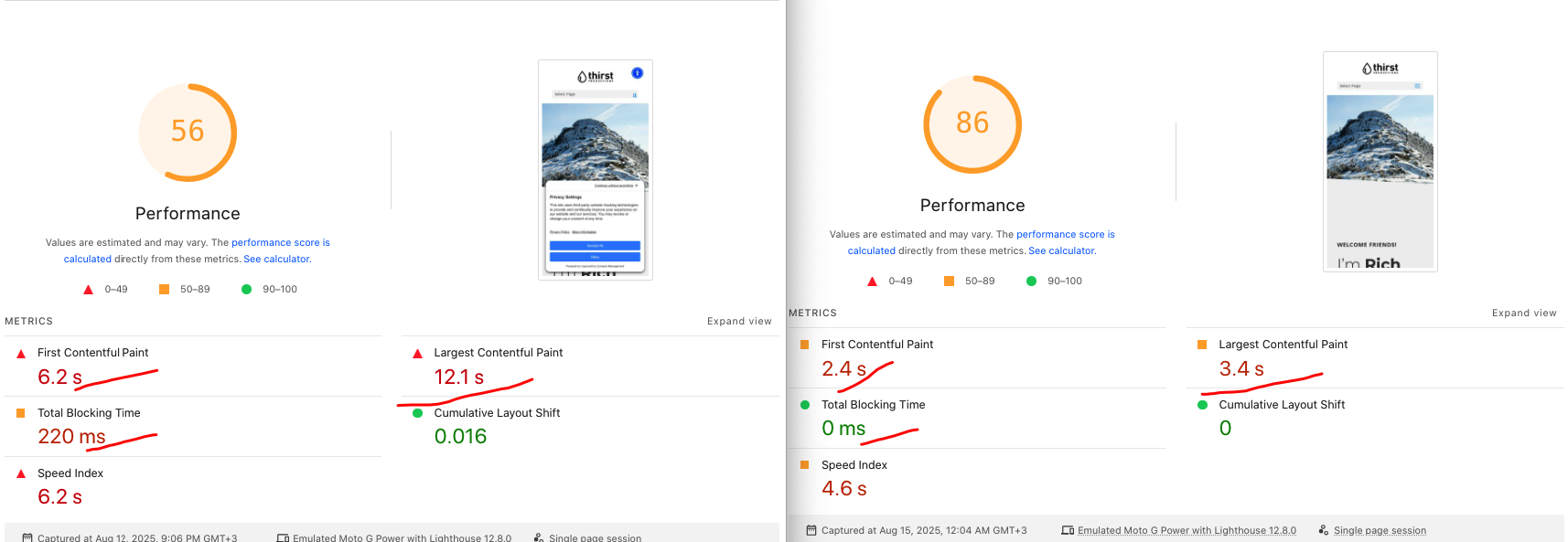
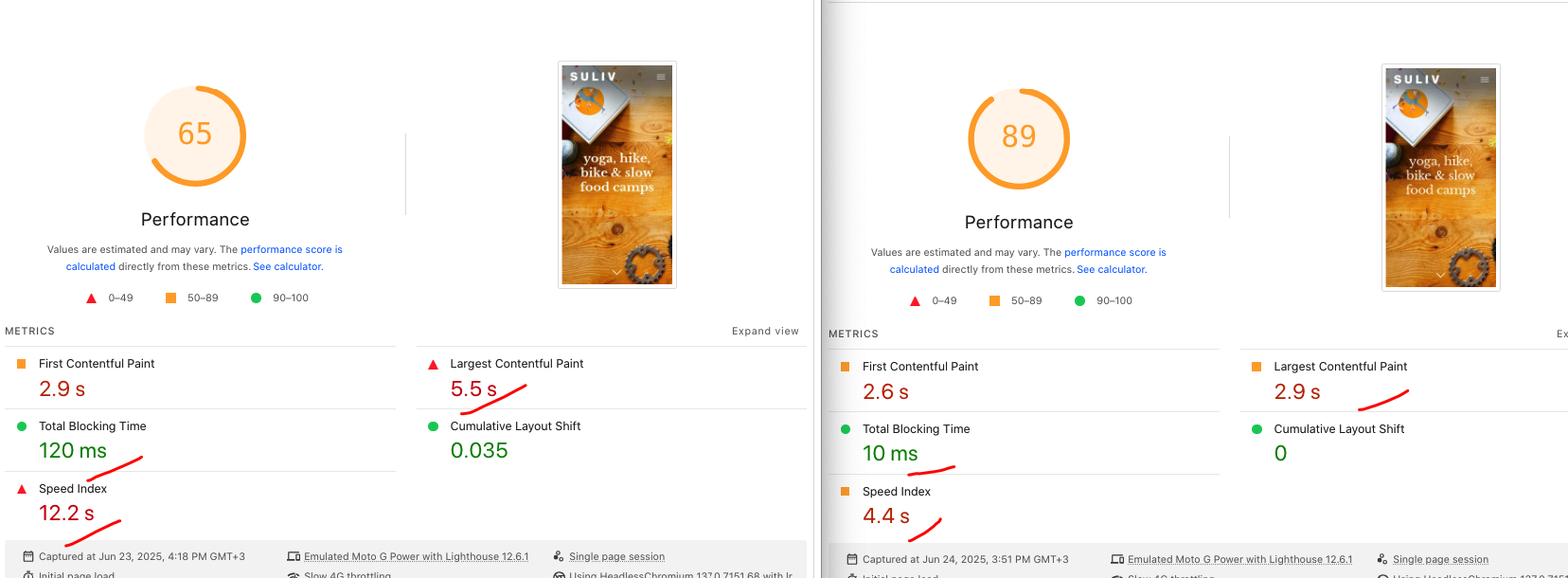
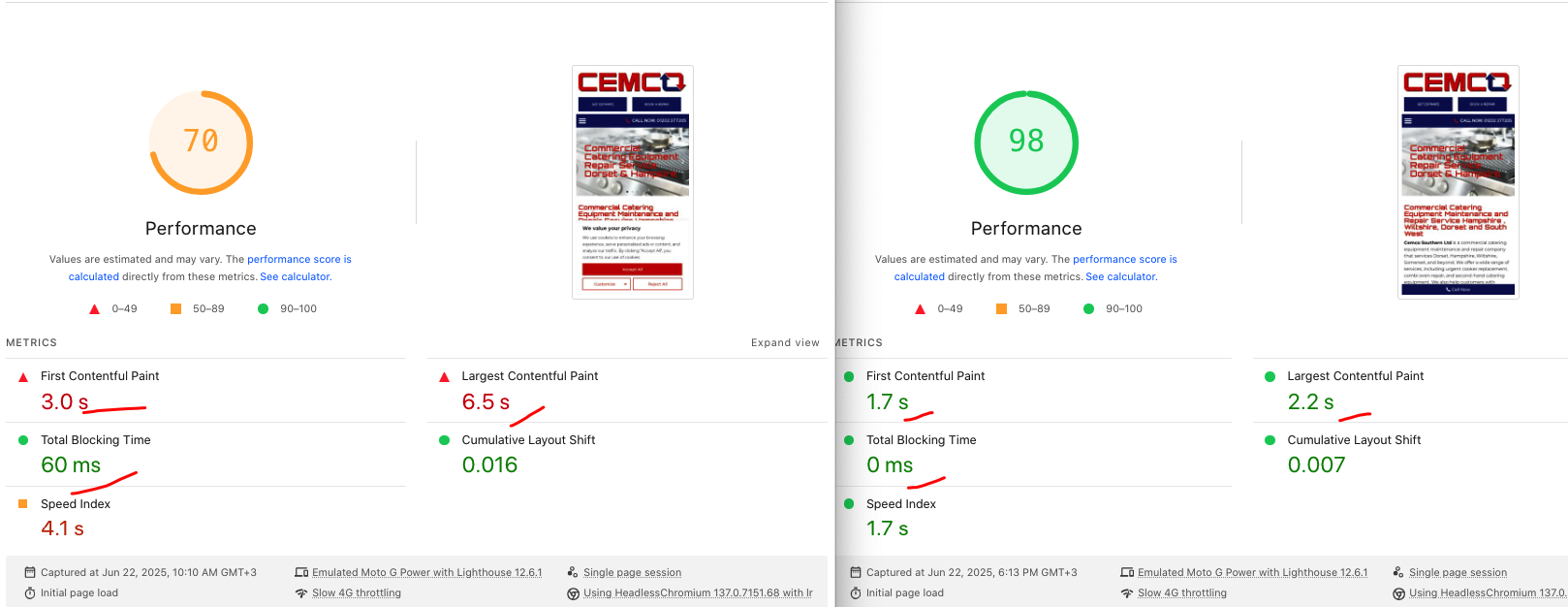
Platforms & Builders I Work With
WordPress & WooCommerce Expertise
I specialize in manual performance optimization for:
- WordPress websites. High-traffic blogs, landing pages, and service websites.
- WooCommerce stores. Product pages, category pages, cart & checkout.
Supported Page Builders & Themes
I work with all popular builders and frameworks, including: Elementor, Avada, Gutenberg (Block Editor), Divi, Thrive Architect, Genesis, Astra, Beaver Builder, ACF Pro, Oxygen, Woodmart, Bricks, etc. Custom themes, child themes, and heavily modified templates are not a problem.
My Optimization Approach. Why I Don’t Start With Caching
A lot of agencies and web speed freelancers enable caching first and stop there. I do the opposite. Caching is the final step not the foundation! Before any caching is applied, I focus on:
- Removing or delaying unused JavaScript and CSS
- Deferring render-blocking scripts
- Optimizing critical rendering path
- Fixing LCP element loading
- Cleaning inefficient third-party scripts
- Optimizing fonts, images, and dynamic assets
Only after the site is technically optimized do I enable caching as a polishing layer to reduce server load and stabilize performance. This approach delivers real, sustainable speed improvements, not fake scores.
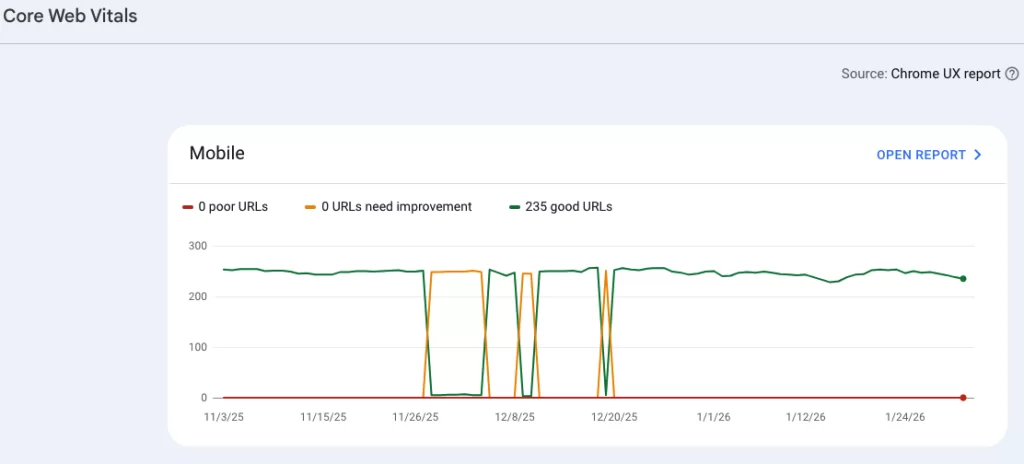
What Exactly Gets Fixed. Typical LCP & Speed Issues I Solve
- Slow hero images and background images
- Render-blocking CSS & JavaScript
- Excessive third-party scripts
- Poorly optimized fonts
- Heavy WooCommerce assets loading everywhere
- Theme and builder inefficiencies
- Incorrect lazy loading configuration
- CLS caused by late-loading elements
- Inefficient server responses (TTFB optimization where needed)
Real Optimization. Not One-Click Plugins
I don’t rely on automated “one-click” solutions. Every optimization is:
- Manual
- Measured
- Tested
- Based on real bottlenecks
This is not about chasing green scores it’s about making WordPress actually fast.
What I don’t do
- I don’t use “score boosting” plugins like NitroPack, Seraphinite, or similar all-in-one acceleration tools.
- I don’t artificially inflate PageSpeed scores using aggressive caching tricks or HTML rewriting.
- I don’t break functionality by blindly delaying all JavaScript.
- I don’t prioritize Lighthouse numbers over real user experience.
Ready to Fix LCP Issues and Speed Up Your WordPress Site?
If slow loading, poor LCP scores, or Core Web Vitals warnings are hurting your site’s performance and conversions, let’s fix it properly. I’ll analyze your site, identify what’s actually slowing it down, and provide a clear optimization plan with pricing and timelines.
Client Testimonials
Trusted by businesses that needed manual WordPress performance optimization, not automated fixes.


Frequently Asked Questions
How long does it take to fix LCP issues in WordPress?
Most WordPress LCP issues can be fixed within 3–7 business days, depending on the site size, theme complexity, and third-party scripts. Large WooCommerce stores or heavily customized themes may require additional time, but there is always a clear plan and milestones.
How much does WordPress speed optimization cost?
Pricing depends on the current site condition and the number of issues affecting performance. Typical projects start from $160 and are quoted after a quick technical audit.
No hidden fees, no monthly lock-ins.
Is caching enough to fix LCP?
No. Caching alone does not fix LCP problems. Caching is applied only after the site is properly optimized and unnecessary scripts are removed or deferred.
What is the main cause of LCP issues in WordPress?
In most cases, LCP problems are caused by render-blocking CSS/JS, poorly optimized hero images, heavy themes, page builders, and third-party scripts. Plugins alone do not fix these issues they must be addressed manually.
Is WordPress speed optimization safe for my website?
Yes. All changes are applied carefully and tested step by step. I never break layouts, functionality, or Wordpress or WooCommerce logic. If needed, optimizations are applied conditionally and can be rolled back.
Will my design or layout change after optimization?
No. The visual appearance of your website remains the same. Speed optimization focuses on how assets are loaded not how your site looks.
Do you optimize for mobile performance?
Absolutely. Mobile performance and LCP/CLS are the top priority, as this is what Google evaluates for Core Web Vitals.
Do you use speed optimization plugins?
Plugins may be used, but only as tools not as solutions. Real performance gains come from manual optimization, not plugin presets.
Do you guarantee Google PageSpeed Insights scores?
I focus on real performance and Core Web Vitals improvements. Scores usually improve significantly, but the primary goal is user experience and stability not chasing 100/100.